
I’ve recently been working on an agentic fraud alert review system for a bank, where our agent monitors transaction alerts and reviews the transaction against context of the bank account as well as any open source intelligence it can gather.
The agent system started as a chat interface – where users could ask questions and probe the graph. We quickly worked out we needed to show what the agent was working on more clearly, so a task list was conceptualised and designed for the users. One amazing observation we’ve had recently is that users are not using the chat interface any more. The task list and information provided in each task about what the agent is working on, its progress, and the agent’s outputs are more than enough for users to work alongside the agents.
The rise of AI agents, powered by LLMs and frameworks like LangGraph, has brought back the vibe of that command-line era. AI Agent demos usually live inside chat interfaces. Type a prompt, get a response. Repeat. And honestly, it works pretty well for those of us who already know how to speak the language of prompts. But for most users? It’s like we handed them a DOS prompt and said, “Good luck.”
I do need to say – chat is great. Chat is flexible. It’s unbounded. It lets users ask anything. But that’s also its biggest flaw. You have to think of the right thing to say. You have to guess what the agent can do, and phrase it just right. It’s the modern version of memorizing command-line syntax.
We can do better. As designers and product people we can understand what our users are using the agent systems for and design outputs and ways of interaction to make them easier to use.
We can now taking the raw power of chat agents and wrapping them in interfaces that make sense to humans.
Imagine this: instead of asking an agent, “Can you show me what we talked about yesterday?”—you just click a tab labeled History. No need to phrase it right. No need to remember the right date. It’s just there.
Or instead of typing, “Generate a report on Q2 sales by region,” you see a panel with dropdowns: “Quarter,” “Metric,” “Region”—and you click. The interface does the remembering. You do the deciding.
This shift isn’t just about convenience—it’s about confidence. When users see what options are available, they explore more. They try new things. They feel in control. That’s something chat interfaces often miss. A blank text box is liberating for power users, but intimidating for everyone else.
Some call this hybrid design. I call it good sense. Use chat for open-ended questions and fuzzy tasks. Use UI for structure, speed, and discoverability. Let the two complement each other.
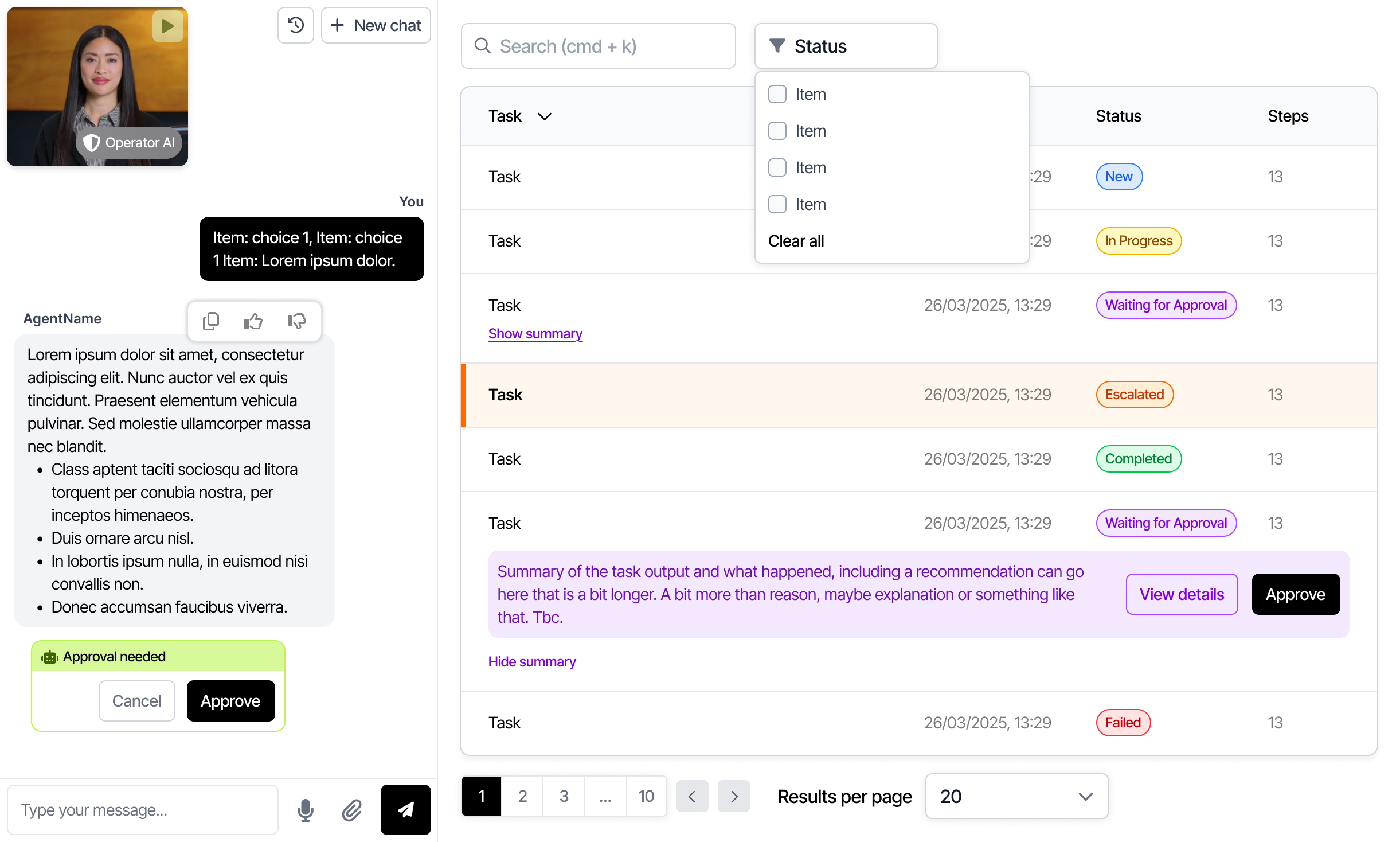
We’re even beginning to explore something wilder: generative UIs. Picture a frame that stays the same—your app shell, your navigation bar—but the main content area is dynamically generated by the agent. Need a chart? It renders one. Need a form? It builds one. It’s early days, but it’s exciting. The agent doesn’t just answer—you interact with its answers.
The takeaway? We’re moving past the novelty of talking to our computers and into an era of working with them. Just like GUIs made personal computing personal, graphical elements in agent interfaces will make AI usable by everyone, not just prompt engineers and early adopters.
So yes, chat has its place. But let’s not stop there. Let’s remember what we learned the first time around: people don’t just want power. They want clarity. They want to see what’s possible.
The future of agent interfaces isn’t just conversational. It’s visual, contextual, and human. Just like the best software always has been.